TMO User Management Search
The goal was to make search fast, intuitive, and capable of handling a variety of account types. However, This involved overcoming both design and technical challenges, particularly around how to filter results efficiently without compromising the user experience or performance.
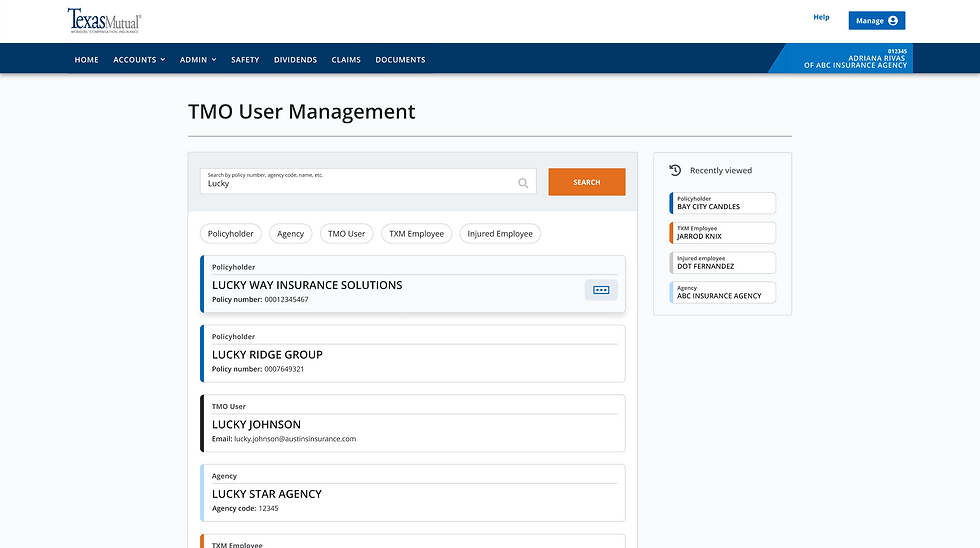
Pill Filters
Exposed pilled filters allow users to quickly refine results by user type.
Color-coding
Based on user type for immediate recognition with main information for quick scanning.
Clickable Card Results
Cards are fully clickable, taking the user directly to the detailed profile page when selected.
Quick Actions
The meatball menu offers quick actions without needing to navigate to the profile.
Recently Viewed
Offers users quick access to frequently searched profiles.
The Ask
Provide a method for employees to search and access any type of account in TMO in a easy and efficient way.
📖
Background
Texas Mutual’s search system was struggling with inefficiency, especially when users needed to sift through large amounts of data to find specific account types. The UX team focused on features that will improve the search experience.
Search Optimization Goals
01
Intelligent Search Recognition
Detect patterns in search inputs to instantly retrieve relevant account types.
02
Efficient Filtering
Allow users to easily narrow down results and find the exact account they’re looking for.
03
Smart Error Handling
Provide helpful messages to guide users when searches return too many or no results
04
Clear User Differentiation
Ensure users can quickly identify account types at a glance.
⚠️
The Pushback
The development team raised concerns. Time constraints and technical feasibility issues arose, particularly with filtering after search results were displayed.
Dev Team
They proposed that filtering be done before the user clicked "Search" to reduce the data being retrieved. They argued this would be ideal for Administrators and ISCs, as it would speed up their searches.
UX Team
We were concerned that it could lead to frustration for regular users as many did not know the exact type of account they were looking for. Nonetheless, we mocked up ways to try and make it work.
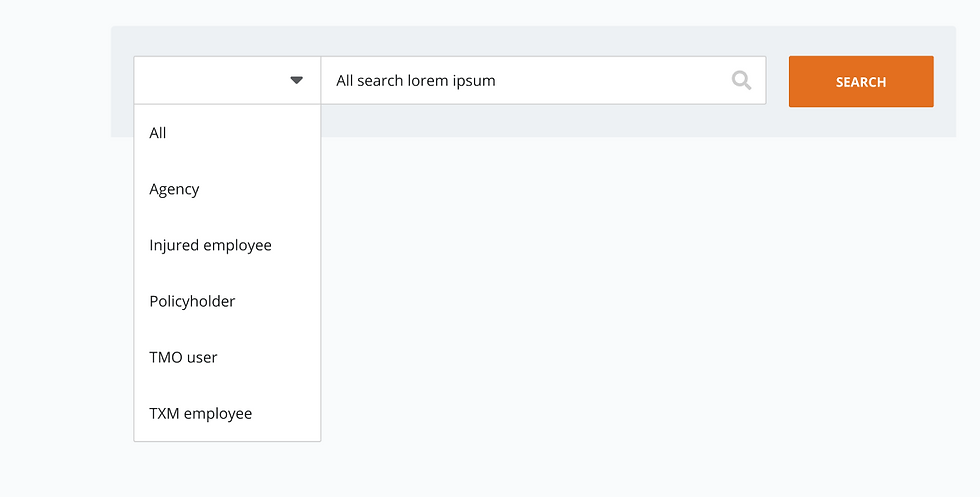


Visual Flow Mapping
To help the dev team visualize the complexity of filtering before search, I created visual flow diagrams that outlined all potential filtering scenarios.
This "if/then" flow illustrated how the system would need to work behind the scenes if filtering occurred before the search was executed.
While the design team acknowledged this approach, it was quickly realized that it could lead to frustration for user with unnecessary steps, longer search times, and confusion about what filter to apply.
💡
The Idea
The design team envisioned a more intelligent search system that would allow users to quickly refine their search using filters.

Intelligent Search Design
The UX design team proposed a solution that would allow the system to recognize the type of input and restrict search results accordingly:
-
10 digits = Policyholder accounts
-
5 digits = Agency accounts
-
"@" symbol = User accounts
Additionally, the system would automatically limit results if the search was too broad:
-
If more than 50 results were returned, an error message would appear with helpful tips to refine their search.
This would guide users to be more specific with their searches, reducing frustration and improving backend efficiency.
🤝🏼
Collaboration
Despite the pushback, the design team and development team collaborated closely to find a balanced solution that would meet user needs while staying within the technical constraints.

Success
The dev team ultimately embraced the intelligent search idea, recognizing it as the best option.
The proposed restrictions for data retrieval as well as the comparison of filtering before the search versus after demonstrated that the proposed solution would balance user needs and system performance.
It also allowed for future scalability, ensuring the platform could handle evolving search requirements.
Increased Search Efficiency
Improved Data Accuracy
Better Performance Metrics
Reduced Frustration

Self-Service View
Serving as a central hub, the profile allows users to manage their accounts efficiently, update personal details, and adjust security preferences with ease. With enhanced self-service capabilities, users can complete tasks independently, reducing the need for support and streamlining account management.
